What "Not readable" means (and why Paceloop won't show a zero)
Last updated: 1 August 2026
"Not readable" means Shopify's data for that metric is missing or unusable on your store right now. Paceloop shows you the gap instead of a number it made up — because "0% conversion" and "nobody visited" are different facts, and an estimate dressed up as a reading would poison everything built on top of it.
You'll see it in "Your last 90 days (what Paceloop sees)" — the baseline grid the pressure-test runs on:
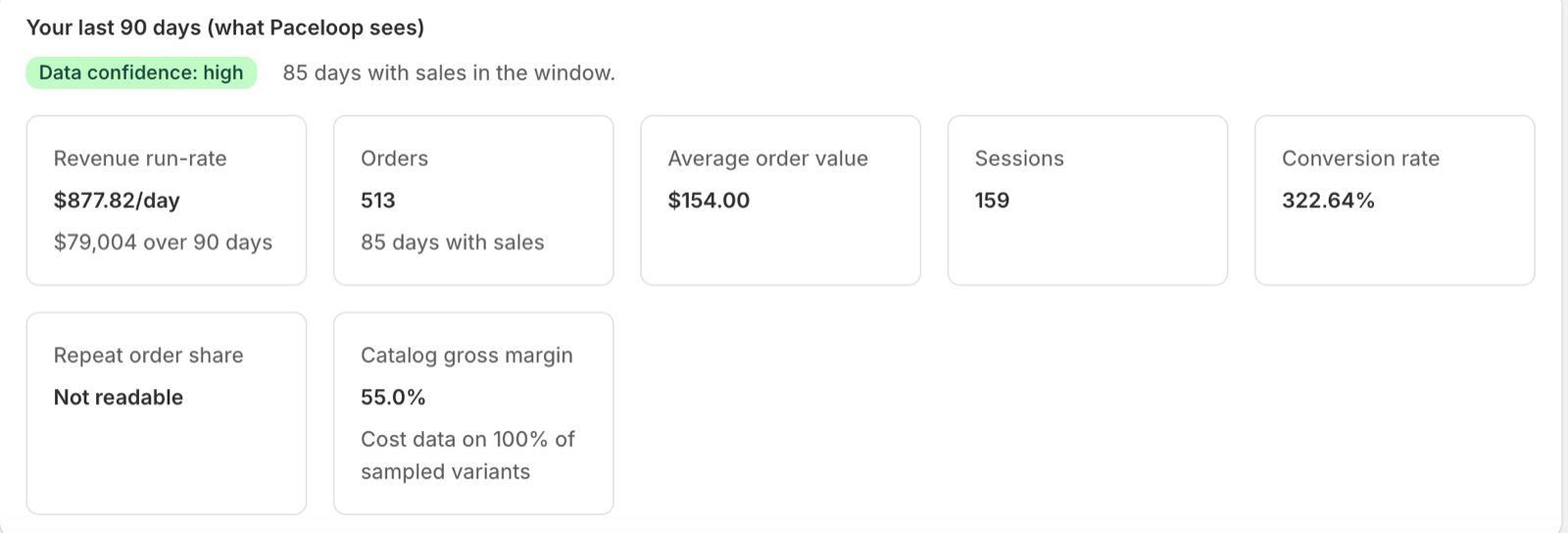
What makes each metric unreadable — and what unlocks it
- Sessions — "No session data on this store yet". Unlocks once your store accumulates visit data Shopify can report.
- Conversion rate — "Needs session data". It's orders ÷ sessions; no sessions, no rate.
- Repeat order share — needs the customer-type breakdown in your analytics; unreadable until Shopify can attribute orders to new vs. returning customers.
- Catalog gross margin — "Add cost-per-item to products to unlock margin planning". Margin needs cost data on at least 30% of your sampled product variants; below that, Paceloop won't average a guess.
- Average order value shows "—" with "No orders in window" when there are no orders — a different situation than untracked data, so it gets different words.
How missing data affects the pressure-test
Unreadable metrics don't silently weaken the analysis — they're disclosed in the verdict, under the banner "What Paceloop can't see (and won't pretend to)". On the store below, that's the repeat rate: "Repeat purchase rate could not be read from analytics." A store with no session data gets the blunter version:
"No session data is available, so conversion rate and traffic can't be assessed. The pressure-test rests on revenue run-rate only."

The same honesty applies to thin history: with only a few weeks of sales, the verdict carries "treat every number here as low-confidence, not ground truth" — and the baseline grid's "Data confidence" badge tells you which tier you're in (60+ days with sales reads high; under 28 reads low).
The same rule, week to week
The refusal to guess doesn't stop at setup. If your cycle grades a weekly rate and a week is too thin to judge — fewer than about 30 events — the coach says so instead of calling it: "too little volume to grade … honestly", because "A weekly rate off a handful of events swings on luck, not on your work — so we won't call this on or off pace."
What to do next
- Check the note under each "Not readable" cell — it names the unlock (session data, customer breakdown, cost-per-item).
- For margin: fill in cost-per-item on your products in Shopify. The cell shows what coverage you've reached.
- For sessions and conversion: these unlock on their own as Shopify records traffic. Come back after a week or two of visits.
- Meanwhile, run the loop on what is readable — Paceloop's verdicts already account for the gaps, out loud.
Every number Paceloop shows you is one it actually read. That's the whole point of the blank ones.
Related: why a target gets flagged as unrealistic · why a traffic sub-target gets refused · set up Paceloop from scratch