How to split one goal into sub-targets
Last updated: 1 August 2026
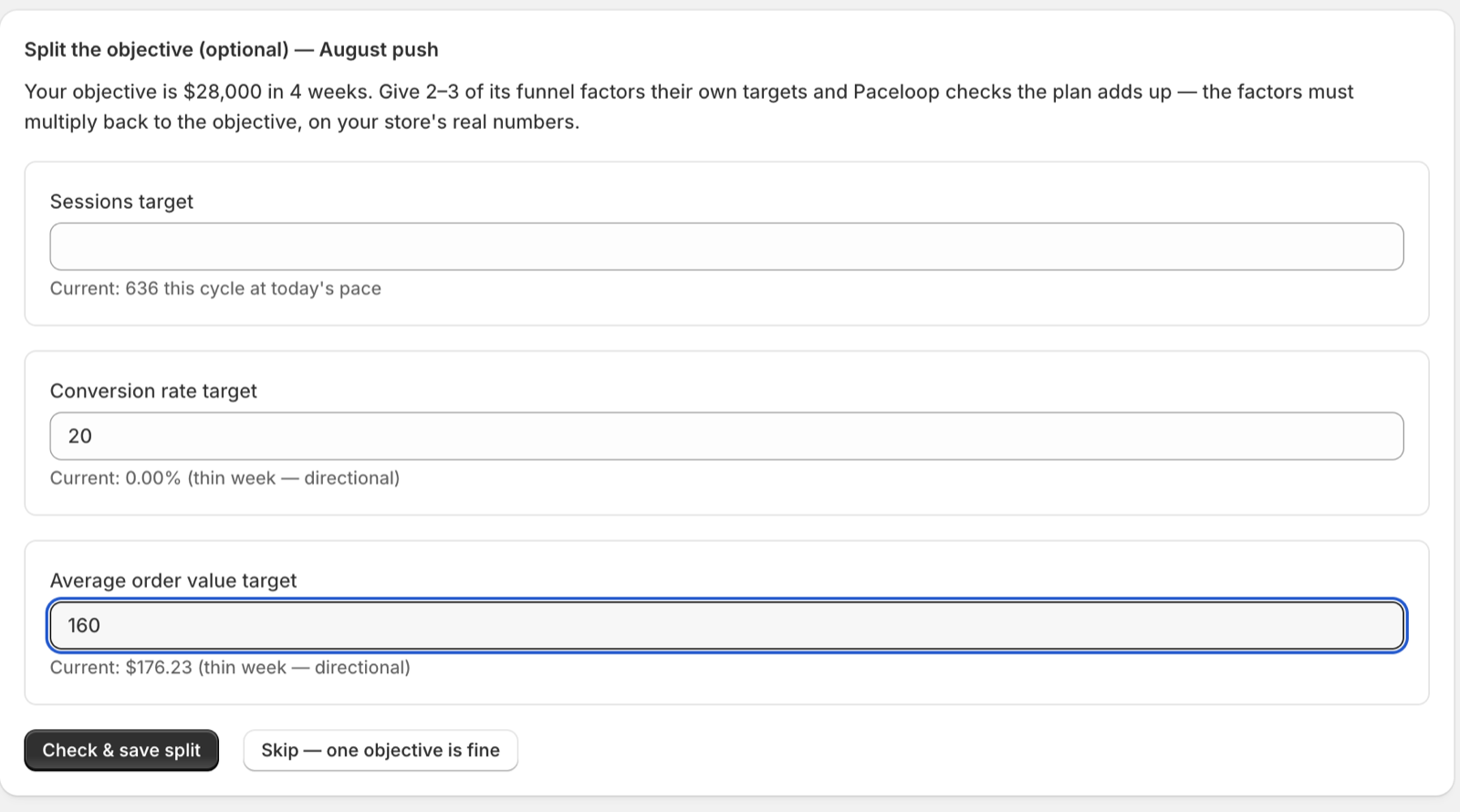
After the pressure-test, Paceloop offers an optional step: give 2–3 of your objective's funnel factors their own targets. Type a number into the factors you want to commit to, leave the rest blank, and press "Check & save split". Paceloop checks on the server that your numbers multiply back to the objective on your store's live figures, then saves. Skipping is a perfectly good answer — "Skip — one objective is fine" is right there, and one objective works.
Where the step sits
It appears between the pressure-test and the plan step, headed "Split the objective (optional)" with your cycle name. The line under it restates what you're being asked:
"Your objective is [your objective]. Give 2–3 of its funnel factors their own targets and Paceloop checks the plan adds up — the factors must multiply back to the objective, on your store's real numbers."
Which factors you get, and why those
You don't choose the factor list — it comes from the objective itself. Revenue is sessions × conversion rate × average order value; orders is sessions × conversion rate. Those are the fields you see, because those are the only quantities that multiply back into the goal.
That's also why there's no repeat-rate field. Repeat rate matters, but it isn't a factor of that identity — a sub-target that can't roll up into the objective is a second goal wearing a sub-target's clothes.
Reading the "Current:" hint
Every field carries a hint with your store's live level for that factor, so you know what you're bidding against before you type:
- "Current: [value]" — a readable level. For a factor that accumulates, it's projected across the whole cycle at today's pace; for a level, it's the level.
- "Current: [value] (thin week — directional)" — the same reading, but off a week with little activity. Treat it as a direction, not a measurement.
- "Can't read this right now — enter a target to include it, or leave it out." — Paceloop has no honest reading for that factor. It won't invent one. If you want it in the split, you have to name the number yourself.
Choosing which factors to set
Two rules make this easier than it looks.
- You don't have to fill them all. Any factor you leave blank is read live from your store at its current level and included in the check anyway. Blank means "assume this stays where it is", not "ignore this".
- Set the ones you intend to work on. A sub-target is a commitment that gets graded weekly on your scoreboard. Leaving a factor blank costs nothing; promising a number you have no plan for costs you the whole check's meaning.
The "Check & save split" button stays disabled until at least one field has a value.
Saving the split
When the numbers multiply back to your objective, you get a green banner and the split is stored:

Under it, Paceloop prints the funnel line it used — each factor with its value, marked "(your current level)" where the number came from your store rather than from you. You can change a number and re-check as often as you like; the split isn't final until you activate the cycle.
If the numbers don't multiply back, Paceloop refuses and does not save, quoting both your objective and what your split actually implies. That refusal has its own article: why Paceloop refused your split. A traffic sub-target on a funnel that's leaking is refused for a different reason — see why Paceloop won't send more traffic to a leaky funnel.
What changes after a split
- Your plan is allocated, not multiplied. The next step is headed "Step 3 of 3 — Allocate 1–3 behaviors across your split", and the cap is unchanged: "Still 1–3 behaviors TOTAL ([n] selected) — a split allocates the plan, it doesn't triple it." Nothing is pre-selected, because three groups of proposals would blow the cap on their own.
- Your scoreboard grows a "Sub-targets" section. Each factor gets its own row with its own status badge, graded weekly on the same live reading the check validated.
- Closing the cycle reports each one. The close summary adds "How the split landed", with each sub-target's final number against its target. A sub-target that couldn't be read at close is recorded as exactly that — "no attainment invented" — never scored as 0%.
- You can mirror the split into Shopify Analytics. An optional checkbox before activation puts each sub-target alongside the objective in your Shopify targets.
A split is worth doing when you know which part of the funnel you're going to work. When you don't yet, skip it and let the constraint diagnosis tell you.
Related: why Paceloop refused your split · what your diagnosis means · how to read your pace scoreboard