How Paceloop targets show up in Shopify Analytics
Last updated: 1 August 2026
When you activate a cycle, Paceloop writes your cycle goal into Shopify Analytics as a growth target, so the number lives where you already look. That write is the only thing Paceloop can change anywhere in your store. It never deletes a target, never silently overwrites one you set yourself, and if the write fails your cycle activates anyway.
What gets written, and when
- Your cycle objective — always, at activation.
- Your sub-targets, if you split the objective and left the mirror box ticked. The checkbox reads: "Also set each sub-target as a target in Shopify Analytics", with the note "The cycle objective always appears there; this mirrors the split too. Targets Paceloop creates stay in Shopify even if the cycle ends."
The sync runs only when you activate through the app. Nothing is written while you are still walking the wizard, and nothing is written in the background later.
What happens if a target already exists
Paceloop checks for a collision before it creates anything, and there are three possible outcomes, each named plainly on the cycle page:
- Set in Shopify Analytics — there was nothing there; Paceloop created it.
- Already existed in Shopify (not managed by Paceloop) — your target matched the metric and date range, so Paceloop adopted it for display and left your number alone.
- Your Shopify target, updated to this cycle's number — only when you ticked the consent checkbox for that specific write. Untick it and, in the app's words, "your Shopify target keeps its current number and this cycle runs on its own."
Paceloop never calls Shopify's delete-target API at all. A deleted target can't be recovered, so the capability simply isn't used.
Starting a cycle from a target you already set
It works in the other direction too. The goal step lists your existing targets under "Targets already set in Shopify Analytics", each with a "Pressure-test this target" button — including targets Paceloop created for earlier cycles.
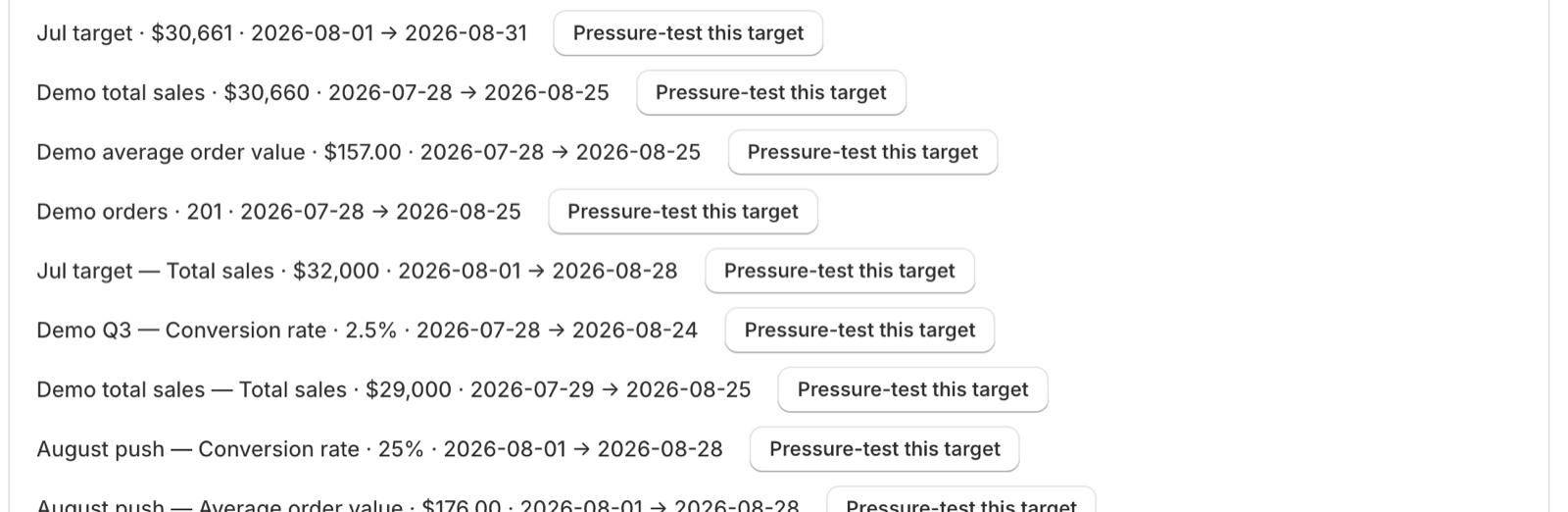
Seeding fills the form and marks it "Seeded from your Shopify target". Every adjustment the seed makes is stated rather than applied quietly — if your target's dates already ended, for example, it says so and proposes the default 4-week cycle instead.
Why total sales and gross sales stay separate
Shopify measures gross sales; Paceloop coaches total sales. They're related but different numbers, so Paceloop refuses to convert between them. Seeding from a gross-sales target keeps your amount as the starting point and says outright: "the pressure test will judge it against total sales."
The same honesty applies to metrics Paceloop can't coach yet — it says "Paceloop can't coach this metric yet — the target stays in Shopify" instead of pretending to manage it.
When the two disagree mid-cycle
If someone edits or deletes the target in Shopify after activation, Paceloop shows "Your Shopify target changed" and states the divergence — it never picks a side for you. You get two buttons of equal weight: adopt Shopify's number, or keep your cycle's. Adopting re-reads the value from Shopify rather than trusting anything on screen.
Shopify is the source of truth for the number. Paceloop is the source of truth for the plan. Neither silently overwrites the other.
If the write fails
A failed Shopify write never blocks your cycle — the cycle activates and the entry shows the error. A "Retry sync" button appears for entries that genuinely failed, and it re-checks Shopify first so an earlier success that got lost is adopted rather than duplicated.
What survives
Targets Paceloop creates stay in your Shopify Analytics after the cycle ends, and after you uninstall the app — see what uninstall removes. They're yours; manage them in Shopify.
Related: set up Paceloop from scratch · how to split one goal into sub-targets · how to read your pace scoreboard