Where your plan's behaviors come from
Last updated: 1 August 2026
Your behaviors come from a curated playbook of weekly practices with a long published track record in DTC commerce, selected by which constraint your store's own numbers pointed at. The numbers inside each rationale are read from your store. Nothing is learned from other merchants, and nothing about the proposals changes based on your own history. Paceloop is explicit about this in the plan step, under "Where these behaviors come from":
"This plan is drawn from a curated playbook of weekly lead measures — practices with a long published track record in DTC commerce — matched to the one constraint your store's own last-90-days data points at. The numbers in each rationale are yours, not an average."
One constraint, one slate
The diagnosis picks the slate. Each of the five levers Paceloop can name — traffic, conversion rate, average order value, repeat purchase rate, gross margin — has its own set of candidate behaviors and its own set of recommended cuts. Diagnose traffic, and you're offered traffic behaviors. Diagnose conversion, and you aren't. See what your diagnosis means.
A slate may offer more candidates than a cycle can run. That's deliberate: the cap of three is a cap on what you activate, not on what you get to choose between.
If Paceloop couldn't diagnose a constraint at all, you get a different, smaller slate whose job is making the store measurable first.
What a proposal contains
Each behavior arrives with a title, a rationale, a measure, and a weekly target:
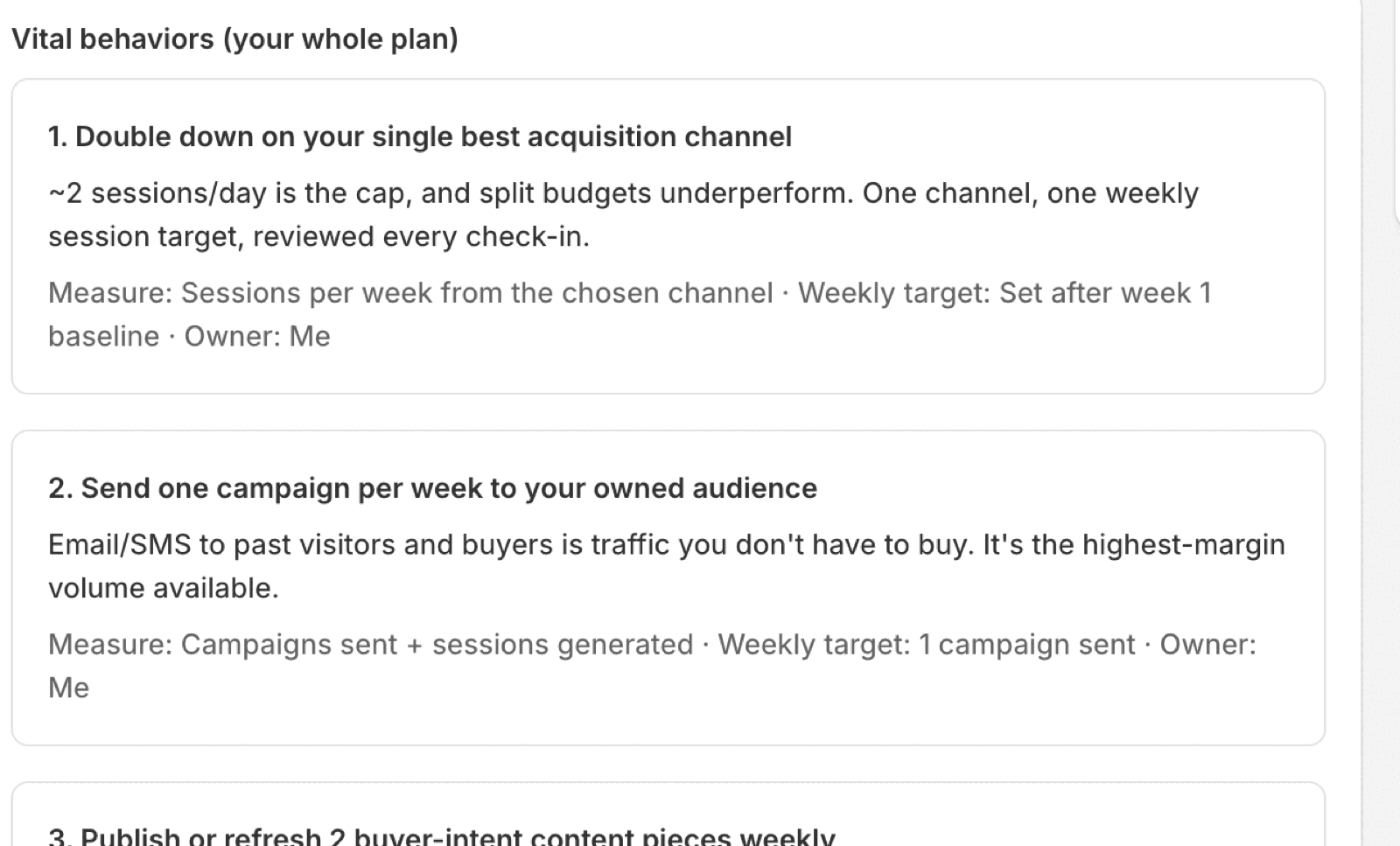
The rationale is where your own store shows up. In the plan above, the first behavior argues from this store's actual session rate rather than from a generic claim about acquisition channels. The line beneath reads "Measure: [how it's counted] · Weekly target: [the number] · Owner: [who]".
You can edit two things: the Weekly target and the Owner. The title, the rationale and the measure belong to the template — a behavior you can rewrite freely stops being a commitment and becomes a note to self.
One to three, total
"Vital behaviors — pick 1 to 3" is the section heading, and the count in it is live. Three is a hard cap, enforced when you pick and again when you activate. If you try to leave with zero or more than three, the app is blunt about why:
"Pick 1 to 3 behaviors" — "Zero behaviors is no plan; more than three is a backlog wearing a plan's clothes."
On a split cycle the cap doesn't grow. It's still one to three total across all your sub-targets — "a split allocates the plan, it doesn't triple it." See how to split one goal into sub-targets.
Your own behavior
There's a slot for something the playbook doesn't know about: "Your own behavior" — "One slot, and it counts toward the same three. You know things about this store the playbook doesn't." You supply what you'll do every week, how you'll know it happened, and the weekly target. Leave it half-filled and activation is blocked until you finish it or remove the slot.
It counts against the same three. A custom behavior isn't a bonus; it's a choice to run yours instead of one of theirs.
Cuts ship switched on
Alongside the behaviors is a list of things to stop doing, checked by default — "Cut from this cycle (recommended)", introduced with "Saying no is the plan's sharpest edge. Uncheck only what you genuinely must keep." Removing work that doesn't touch the constraint is the point of the product, so you opt out of a cut rather than opting in.
Once the cycle is live, the cuts stay visible next to the plan they protect:
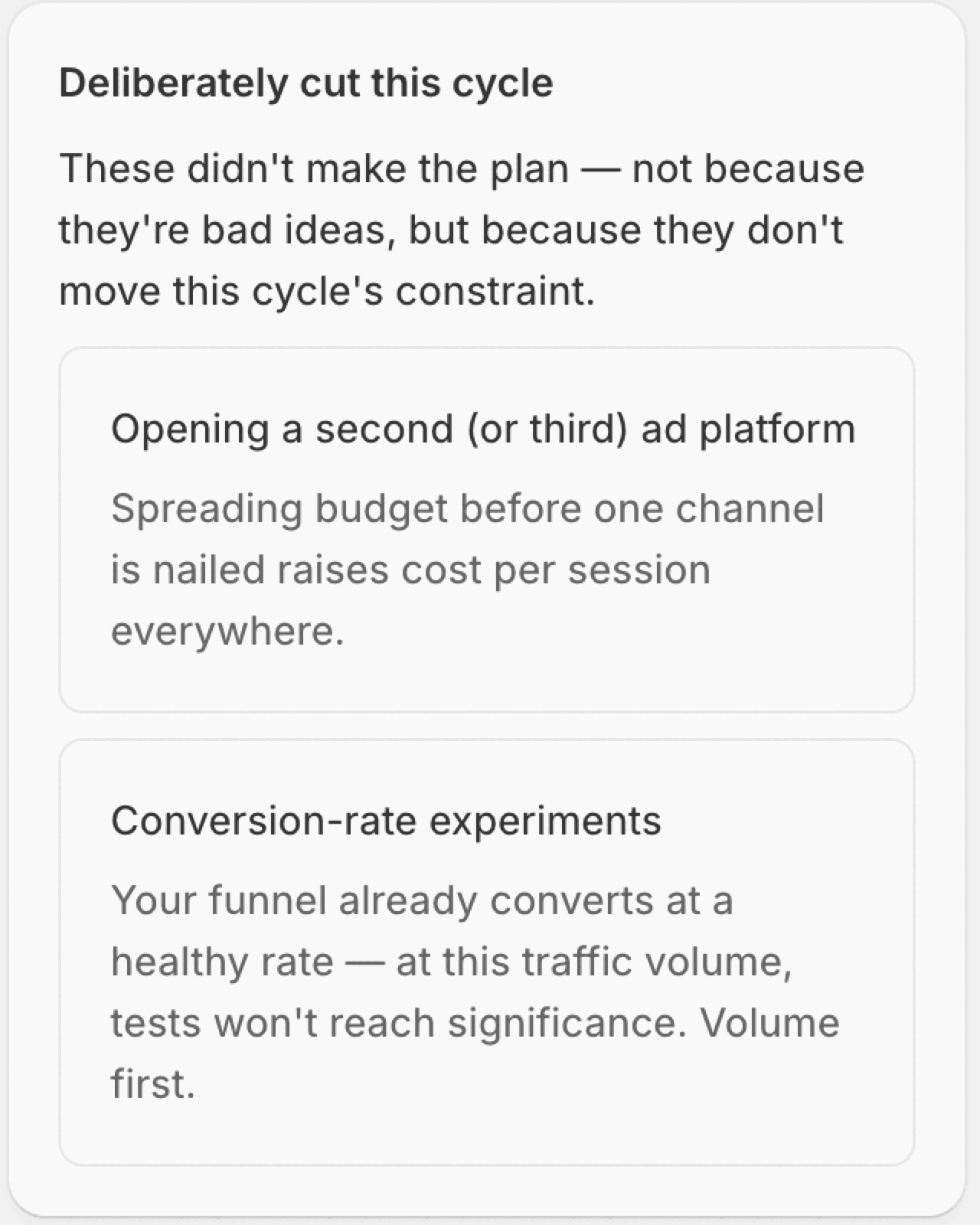
Each cut carries its own reason, and the reasons are specific to your diagnosis — a conversion experiment gets cut on a low-traffic store because the test can't reach significance, not because testing is bad.
What your last cycle adds
Once you've closed a cycle, Paceloop shows you what each behavior actually did in your store. Repeated behaviors carry a label — "You kept this last cycle", "You skipped this last cycle", or "Partly done last cycle" — with a detail line counting the weeks you checked in. The disclosure above them is precise about whose history it is: "the labels below come from your own last cycle, nobody else's."
The labels are exactly that: labels. Which behaviors are proposed, and in what order, is unchanged by your history. Paceloop shows you your record and leaves the decision with you.
The labels are matched by behavior title, and only from your most recent closed cycle. Rename a behavior and it simply loses its label rather than picking up the wrong one.
When there's no playbook for your metric
Some metrics Paceloop can track but won't pretend to coach. Those cycles get a watch-only plan — heading "Tracked, not coached" — with a live pace scoreboard and no behaviors at all:
"We'll track [your metric] and show your pace, but we won't invent a plan for it. Coaching a metric we can't decompose into levers would be exactly the confident guessing this coach exists to avoid."
Related: what your diagnosis means · how to do your weekly check-in · set up Paceloop from scratch